
CLM-8B
CLM-8B scores candidate actions against a state. Its open-weight reference release, Contrastive-LM/CLM-v0.1-8B, combines a frozen Qwen3-8B encoder with two projection heads under Apache-2.0. It is useful when your application can describe the choices in advance: routing a ticket, selecting a tool, or ranking proposed answers. Reusing candidate embeddings can reduce repeated work; the cost depends on the state, candidate set, cache misses and serving configuration.
Content reviewed:
Use this model
Official model repository
- Get the CLM-v0.1-8B reference release
Model card, downloads and license conditions.
Local tools and guides
- CLM installation and API documentation
Follow the tool’s installation and hardware requirements.
What can CLM-8B decide?
- Route a support request among named departments, with descriptions of the cases each department handles.
- Score a fixed set of tool descriptions against the current agent state before calling one tool.
- Rank several answers or patches produced by a separate generator, then evaluate the selected candidate.
- Reuse a stable action vocabulary across game or control states, measuring response latency through the whole application.
How to run CLM-8B locally
Install the contrastive-lm package and serve Qwen/Qwen3-8B as an embedding encoder through vLLM. Start clm-serve in a second terminal; it downloads the reference projection heads and exposes an API and playground. Both services are required. The head download is small, but the full 8B encoder still needs device memory.
The reference setup uses a 2,048-token encoder limit. Longer states require matching limits on both services and a fresh memory and latency measurement. Shorten a state by preserving the evidence needed to choose an action, rather than dropping the end of a document that contains the decisive detail.
pip install contrastive-lm

# Terminal 1: frozen Qwen3 encoder
vllm serve Qwen/Qwen3-8B --served-model-name qwen3-8b \
  --runner pooling --max-model-len 2048 --port 8090

# Terminal 2: CLM API and playground
clm-serveGive CLM a state and meaningful choices
A useful first task is ticket routing. Supply the customer message as the state, then explain what billing and technical support handle. Evaluate a sample of real tickets with known destinations before letting the prediction route incoming work. Include cases where neither department fits.
Candidate probabilities describe preference within the supplied set. If all candidates are poor, the highest score still selects one of them. Test ambiguous inputs and an explicit defer choice separately; a confident-looking distribution alone is insufficient to authorize a consequential action.
from clm import CLMClient, Choice

client = CLMClient()
result = client.system_one(
    state="A customer says their invoice was charged twice.",
    questions={
        "department": Choice(
            instructions="Which team should handle this request?",
            criteria={
                "billing": "Charges, invoices and refunds",
                "technical": "Bugs, errors and outages",
                "defer": "The request needs human triage",
            },
        ),
    },
)
print(result.answers["department"].choice)
Action caching changes CLM-8B latency
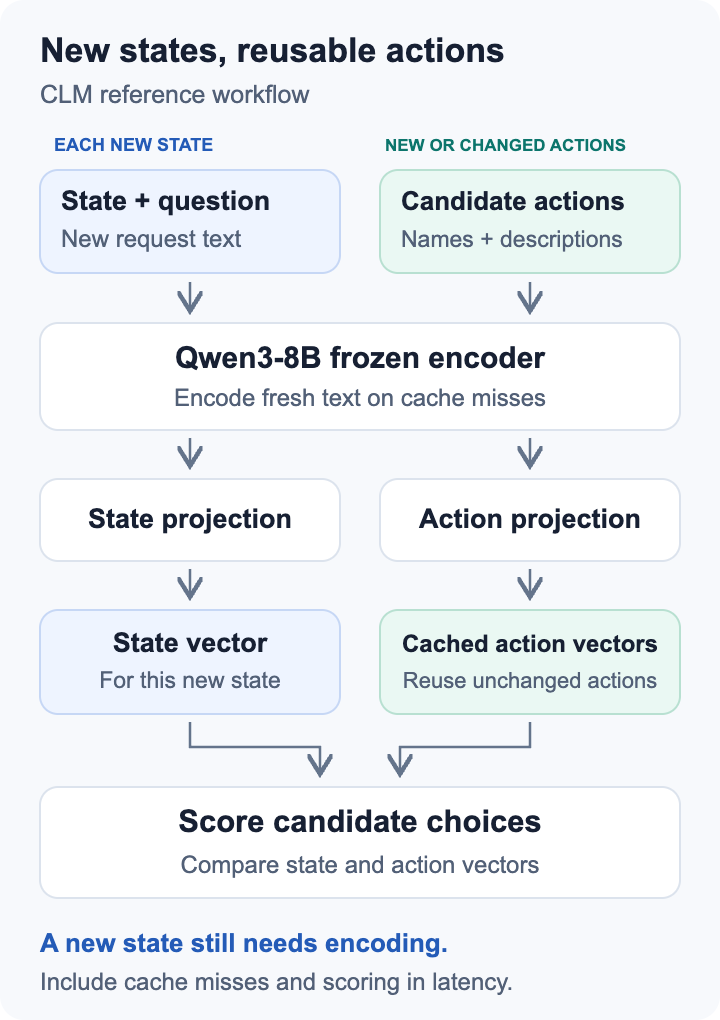
State and action embeddings are computed separately. A fixed tool menu can reuse its action vectors across requests, while each new state still needs encoding. If candidate descriptions change with every request, those candidates need new embeddings too. Record candidate count and cache hit rate alongside latency.
A ticket router and a best-of-N patch verifier therefore have different cost profiles. The router can reuse department descriptions; a verifier evaluates fresh patches produced by another model. Include the generator’s cost in the complete workflow budget. A faster scoring stage does not remove the cost of creating candidates.
Measure from the application request to the returned decision after warm-up. Include HTTP overhead and every encoder call. Keep startup and initial candidate-cache construction as separate figures if the endpoint restarts often. Report average sequential latency for the calculator and tail latency for operational planning.
CLM vs Jev: what an independent test found
In a September 30 update, null_teck tested CLM locally on an RTX 3090 24GB and Jev through a cloud API. A Rocket League workload evaluated 12 fixed actions across four questions. CLM took 808.4 ms with cold action embeddings and 115.6 ms after caching them, with 491 ms of cache initialization. Jev’s median was 228.1 ms including network time. These setups describe end-to-end experiences on different infrastructure.
The same author revised a 13-case deception test from 30.8% to 84.6% accuracy by replacing keyword choices with descriptive declarative actions and caching them. Mean probability assigned to the correct abstention choice on two ambiguous cases remained 11.4%. Test candidate wording and ambiguous evidence together; caching improved speed without resolving every decision failure.
The publisher’s DeepSWE and Terminal-Bench verifier results use separately fine-tuned heads. When evaluating the downloadable reference release, keep those variants distinct. Choose a representative task set and score both correct selections and appropriate deferrals.
Estimate cost per CLM decision
Use the decision calculator with CLM-v0.1-8B selected. Enter your measured latency, questions per request, monthly request volume and the time the endpoint stays provisioned. Add a complete instance hourly quote for cloud cost, or a device quote and whole-system wall power for local cost. Keep the measurement note specific to the encoder, heads, precision, candidate count and cache regime.
For example, four-question requests averaging 120 ms give 8.33 sequential requests and 33.33 decisions per second. At 100,000 requests a month, active inference occupies 3.33 hours. Measure latency with all four questions together.
An endpoint kept up for 720 hours at an assumed $0.50 per hour costs $360 in compute, even when requests occupy only a few hours. Divide the total monthly budget by 400,000 decisions to get $0.90 per 1,000 decisions before operations labor. The calculator includes your labor assumption and shows capacity separately from provisioned cost.
The Jev column prices the same request count with the average input-token usage you enter. Quality still needs its own test. Compare accepted decisions, deferrals, failed actions and repair work before treating the cheaper path as the better deployment.
Choosing CLM, Laya or a managed decision API
CLM is worth evaluating when reusable action descriptions and control over local inference matter. Start with a stable tool or routing menu. Laya offers smaller checkpoints and a different typed-decision implementation; compare accuracy and memory on your actual inputs. Jev supplies a managed API when running an encoder service would add more work than the application needs.
Keep the same state and intended decision across comparisons, but use each model’s documented input structure. Forcing every model through a poorly suited prompt can measure the adapter rather than the model. Preserve each configuration so a surprising result can be investigated.
Before you use it
- CLM returns scores or typed choices from supplied candidates; a separate generator is needed to create free-form answers or patches.
- The reference heads require the matching Qwen3-8B encoder and pooling implementation.
- Fresh candidates, long states and verifier fine-tuning change the workload; each needs its own latency and quality evaluation.
How to get started
Run the reference playground with a small routing task, test candidate wording and deferral behavior, then measure your serving setup and enter it in the decision calculator.
Sources
Sources (4)
- CLM-v0.1-8B model card ↗
Source checked:
- CLM reference code and usage ↗
Source checked:
- CLM Apache-2.0 license ↗
Source checked:
- null_teck local decision comparison ↗
Source checked:
Calculators
Using this calculator for this model
Enter questions per request, requests per month and provisioned hours. To estimate capacity, supply measured request latency and name the exact workload and device. Average input tokens are used for the separate API comparison; decision models do not generate output tokens.
How to fill in the calculator
- Deployment
- Local estimates use hardware ownership, electricity and operations; cloud estimates use hourly rental pricing. Compare the path you are considering.
- Request mix
- Use questions per request, monthly request count and provisioned hours. Leave latency blank until you have a matching measurement; memory fit alone does not establish throughput.
- Checkpoint and measurement
- Choose a checkpoint belonging to this model. Measure request latency for the same questions, input size, runtime and device; do not substitute chat-token generation speed.
Use the calculator for a deployment budget; enter your expected usage and measured wall power.