
Liquid d1: Decision API, Pricing and Jev Comparison
Liquid d1 turns text and images into typed decisions with probabilities for routing, classification and rubric scoring. Its paid native d1 route costs $0.02 per million input tokens; d1-ultra costs $0.042. Both have free output and bill each question’s text and supplied images. Choose a hosted route for a first task, or the separate d1-3B and experimental d1-omni-600M checkpoints for local inference.
Content reviewed:
Use this model
API docs and console
- Get a Liquid API key
Provider account and usage billing apply.
Where can Liquid d1 replace a generated answer?
- Route a customer message to a named queue, using a description of what each team handles.
- Sort incoming work by an ordered urgency rubric that your team can evaluate against labeled examples.
- Ask a yes/no question about an input and use its probability to separate clear cases from cases needing review.
- Choose among tool descriptions before a separate agent executes the selected tool.
- Inspect a circuit-board photo for visible defects, classify a drawing or decide from a screenshot using the same typed questions.
Compare with the current Perplexity Decider API
Compare Liquid d1 with Perplexity’s current v1.2 or Flash API on the same labeled routing workload. Perplexity can share state processing within a question group; Liquid bills each question’s prompt separately. Use returned input usage and retries to compare cost per accepted decision. Perplexity’s historical Apache 2.0 v1.1 checkpoint has a separate self-hosting budget.
When to choose d1-ultra
Liquid introduced d1-ultra on October 15 for text and image decisions, including named noul, choice and score questions. Use model d1-ultra at https://api.liquid.ai/decisions/v1/systemone through Liquid’s native API. Start with the official request example and your own labels before switching an existing d1 workload.
d1-ultra costs $0.042 per million input tokens with free output. Each question is billed for its own prompt, including the text and all supplied images. Three questions over the same content therefore need three input budgets; Perplexity’s shared-state grouping rules do not transfer to this endpoint.
Liquid counts 1.5 tokens per 32×32 image patch, so a 1024×1024 image contributes 1,536 tokens per question. For an assumed 100,000 questions with 2,000 billed input tokens each, the token bill is $8.40. Use measured request usage for real workloads and include retries.
The launch announcement describes a larger open-model base and reports vendor evaluation results. That is not a release of d1-ultra weights. The smaller d1 checkpoints below remain different deployment options. Liquid’s announcement places Vercel and OpenRouter access in a coming-soon section; use the native API path unless your gateway currently lists the exact ultra model.
Liquid d1 outputs: Choice, Score and Noul
Choose the output shape your workflow needs. A support router needs named categories; an urgency sorter needs ordered levels; a yes/no check needs a probability. In each case, write criteria that distinguish neighboring answers. “Billing handles charges and invoices” gives a router more useful information than a bare department name.
In the illustrated checkout example, the hypothetical Choice probabilities are technical 86%, billing 10% and triage 4%. Urgency levels are indexed 0 (can wait), 1 (today) and 2 (time-sensitive); probabilities [0.05, 0.15, 0.80] give a weighted Score of 1.75. Noul is 0.94 for “Is this a bug report?”.
A Noul value near 0.5 expresses uncertainty between yes and no, rather than medium severity. Use Score for severity, with descriptions of each level. For routing, examine the Choice distribution when two departments both fit. Decide how your application handles that ambiguity before connecting the answer to an action.

| Question type | Answer | Example task |
|---|---|---|
| Choice | Selected option and probabilities over named options | Billing, technical support or human triage |
| Score | Probability-weighted position on an ordered rubric | Rank a ticket from routine to service outage |
| Noul | Probability that the answer is yes | Does the customer request a human agent? |
Make a first Liquid d1 API call
Create a key in the Liquid console and set LIQUID_API_KEY in your terminal environment. The request below asks which queue should receive a duplicated-invoice ticket. It follows Liquid’s current documented endpoint, /decisions/v1/systemone, and uses d1:free. The result contains a named answer and probabilities; your application chooses what to do next.
Start with a small set of tickets with known destinations. Include short messages, contradictory descriptions and requests spanning two teams. Compare the predicted category and the runner-up probabilities with those labels. Keep uncertain cases in a triage queue while you adjust the criteria.
curl https://api.liquid.ai/decisions/v1/systemone \
  -H "Authorization: Bearer $LIQUID_API_KEY" \
  -H "Content-Type: application/json" \
  -d '{
    "model": "d1:free",
    "state": "My subscription invoice was charged twice.",
    "questions": {
      "queue": {
        "type": "choice",
        "instructions": "Which team should handle this request?",
        "criteria": {
          "billing": "Charges, invoices and refunds",
          "technical": "Bugs, errors and outages",
          "triage": "Requests that need a human to choose a team"
        }
      }
    }
}'Inspect an image with paid d1
Send a local JPEG as a Base64 data URL in images alongside state and questions. Use model d1 on Liquid’s direct HTTP endpoint: d1:free rejects images, and the TypeSafe SDK currently has no image input support. The example asks two independent questions about the same board; your application reads answers.defect.noul and answers.board_type.choice.
Liquid’s official Playground demonstrates inspection on four VisA production-line categories: circuit boards, candles, cashews and chewing gum. Liquid reports 85–97% accuracy in those examples. It also demonstrates reading a Wordle board from a screenshot. These publisher examples show concrete visual tasks; choose questions and labeled images that match the parts or screens in your workflow.
All questions receive all images in the request, in the supplied order. For a reference-and-inspection pair, identify image 1 and image 2 in the state and ask about the inspected part. JPEG, PNG, WebP and GIF are supported, with at most eight images, a JSON body below 4.5 MB and at most 10,000 patches of 32 × 32 pixels across all images. Each image’s longer side must be no more than 100 times its shorter side. Compress or resize before Base64 encoding when the body is too large.
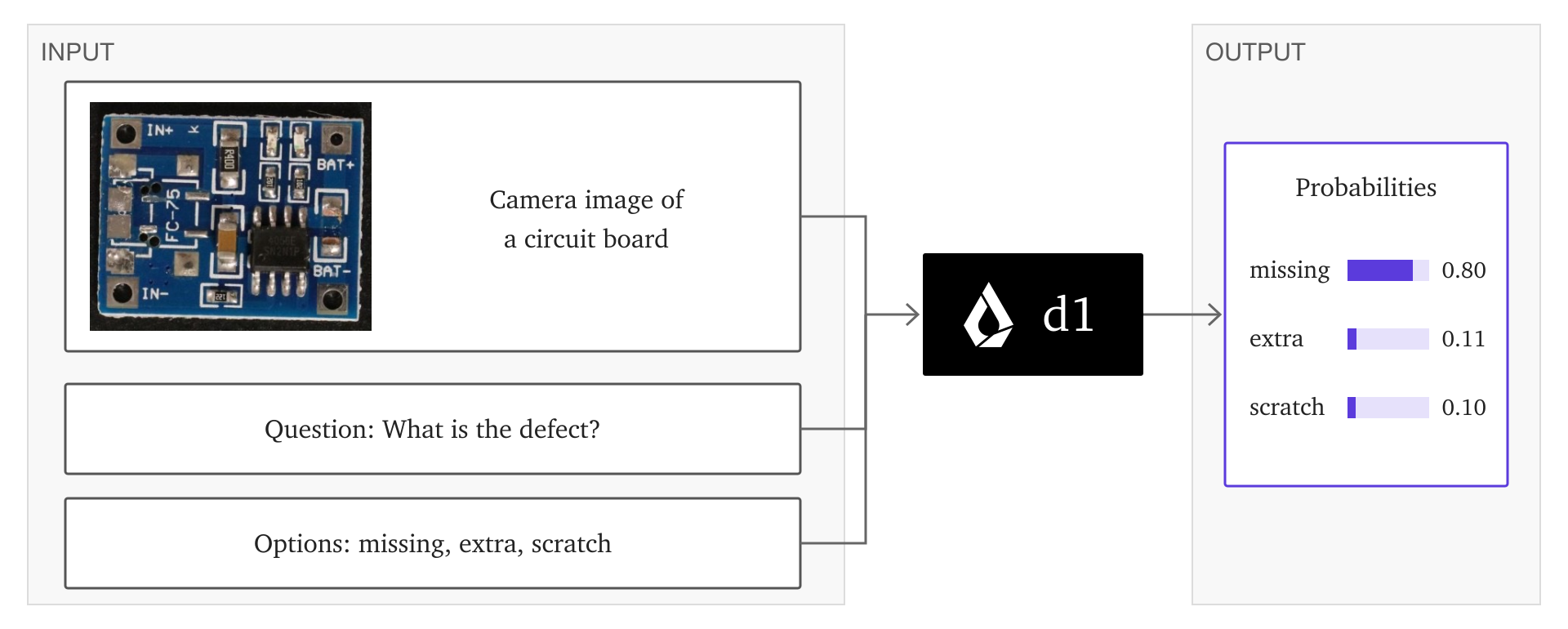
IMAGE_BASE64=$(base64 < board.jpg | tr -d '\r\n')
curl https://api.liquid.ai/decisions/v1/systemone \
  -H "Authorization: Bearer $LIQUID_API_KEY" \
  -H "Content-Type: application/json" \
  --data-binary @- <<JSON
{
  "model": "d1",
  "state": "Camera image of a circuit board on the production line.",
  "images": ["data:image/jpeg;base64,$IMAGE_BASE64"],
  "questions": {
    "defect": {
      "type": "noul",
      "instructions": "Does the board have a visible defect?"
    },
    "board_type": {
      "type": "choice",
      "instructions": "Which description best matches this board?",
      "criteria": {
        "assembled": "Components are installed on the board",
        "bare": "A board with no installed components",
        "unclear": "The image is insufficient to decide"
      }
    }
  }
}
JSONChoose a channel that accepts your input
For visual decisions, call Liquid directly with paid d1. For text-only routing, the free SKU or either gateway is an alternative. Send the images array through Liquid’s direct endpoint.
| Channel | Model | Input and request path |
|---|---|---|
| Liquid paid API | d1 | Text and images; direct HTTP /decisions/v1/systemone |
| Liquid free API | d1:free | Text only; the same endpoint |
| OpenRouter | liquid/d1 | Text only; use the gateway’s documented request format |
| Vercel AI Gateway | Liquid d1 | Text only; use Vercel’s decision-model integration |
| TypeSafe SDK with Liquid | d1 or d1:free | Text requests; use direct HTTP for images |
Liquid d1 pricing: input tokens and hosted access
Liquid’s current pricing page and OpenRouter’s liquid/d1 listing both charge $0.02 per million input tokens and cached input tokens, with free output, checked October 18, 2026. Cached input has no lower rate for this SKU. OpenRouter lists a roughly 66K-token context. Earlier October 2 and October 5 quotes were $0.04 per million input tokens; use the current listed rate for a new budget. The separate text-only d1:free offer is a different SKU.
At the OpenRouter input rate, 100,000 calls averaging 1,000 billed input tokens cost $2. If the average grows to 5,000 tokens, the same call volume costs $10. Include the questions and criteria in the input count as well as the state. Adding a generation step to explain or act on a decision adds that model’s cost to the workflow.
| Access route | Model ID | USD rates; checked October 18, 2026 |
|---|---|---|
| Liquid paid API | d1 | $0.02 / 1M input or cached input tokens; $0 output; images counted per question |
| Liquid free API | d1:free | Text-only free-tier SKU |
| OpenRouter | liquid/d1 | $0.02 / 1M input or cached input tokens; $0 output |
| Example: 100M input tokens | liquid/d1 | $2 at the listed input rate |
What do two questions about one image cost?
Liquid counts 1.5 input tokens per 32 × 32-pixel patch. For each image, round width ÷ 32 and height ÷ 32 up to whole numbers, multiply them, then multiply by 1.5 and round up again. A 1024 × 1024 image has 1,024 patches, or 1,536 billed tokens per question. Two questions about that same image count 3,072 image tokens: 3,072 ÷ 1,000,000 × $0.02 = $0.00006144 for the image portion of one request. At 100,000 such requests, the image portion is $6.144, plus the billed text for each question. This example uses Liquid’s paid d1 rate checked October 18, 2026; the total follows the image dimensions and question count above.
Combining questions reduces network round trips, but the supplied image is billed for every question. Read usage.input_tokens to include the state, instructions and criteria actually billed. A separate text-generation step adds its own input and output fees.
Liquid’s 19–200× lower-cost comparison covers six applications run once per model on October 5, at list prices without prompt-cache discounts and with the comparison models at default reasoning settings. It is evidence about those applications, rather than a saving to apply to every visual workload.
Liquid d1 vs Jev in an independent API test
LocalLLaMA’s typed-decisions benchmark measured d1 through Liquid’s API on September 30: 400 cases, five questions per request, 2,000 decisions and zero errors. Its hosted rows report sequential client-to-answer median latency. The same client code was used for the Jev row, measured on September 18.
The test labels are averages of three samples from a roughly 4B-class teacher. Accuracy here measures agreement with that teacher. d1’s 0.742 score exceeds Jev’s 0.727 in this test, while meraGPT Decider 1 scores 0.768. This gives you a reproducible comparison to investigate, rather than an accuracy forecast for your ticket queue.
The per-type results also matter: d1 scores 0.840 on Noul, 0.732 on Choice and 0.677 on Score. A workflow built around rubric scoring deserves a separate trial from a yes/no filter. Evaluate errors by category, since one average can hide the decisions that are expensive to get wrong.
| Hosted model | Teacher agreement ↑ | KL divergence ↓ | Client p50 |
|---|---|---|---|
| Liquid d1 | 0.742 | 0.475 | 525 ms |
| Jev 1.13.0 | 0.727 | 1.442 | 710 ms |
| meraGPT Decider 1 | 0.768 | 0.096 | 526 ms |
Choose Liquid d1, Jev or a local decision model
Liquid d1 and Jev both offer hosted typed decisions, so a comparison can reuse your task descriptions and labeled cases. Measure response time from the application, track routing errors and count total billed inputs. Keep the provider and model ID in the results so a free-tier trial does not become an assumed permanent operating price.
Jev 1.13 and 1.14 also accept experimental image requests with TypeSafe’s image header; Box questions require 1.14. Liquid’s paid direct d1 route has its own image format and billing. Compare the same visual task and channel, or use Clef’s visual-input and self-hosting options.
For local inference, Laya and CLM-8B offer downloadable checkpoints with different serving paths. CLM scores candidate actions and can reuse candidate embeddings. Laya exposes decision outputs through its own runtime. Local deployment adds device memory, serving and idle-time costs; use a measurement from the exact model and workload in the decision calculator.
Run the new d1 weights locally
Liquid now publishes LiquidAI/d1-3B and the experimental LiquidAI/d1-omni-600M as downloadable decision models. These checkpoints are separate from the hosted d1 and d1:free API SKUs. d1-3B accepts text and images; the experimental omni checkpoint also adds audio inputs. Use each checkpoint’s model card for its supported request format and runtime.
The weights use the LFM Open License v1.0, rather than Apache 2.0. Its commercial-use condition is tied to annual revenue: the license defines the threshold as $10 million or more, and Section 5 excludes commercial use by a Legal Entity exceeding that threshold. A Legal Entity includes entities under common control, not just one deployment team. Below the threshold, commercial rights are granted subject to the license; above it, obtain separate permission from Liquid before commercial use. The revenue threshold does not apply to a qualified nonprofit’s noncommercial or research use. They return typed decisions in a single forward pass with zero generated output tokens. Budget device memory, serving time, idle capacity and input processing; local costs follow the compute used for each decision.
For these local checkpoints, start with a small labeled workload, include refusal handling and measure the runtime configuration. Compare accepted decisions and complete serving cost with the existing hosted service.
Before you use it
- Liquid d1 returns decisions and probabilities. Pair it with a text generator when the user needs a written explanation.
- A hosted request sends the supplied state and criteria to the provider. Choose a local model when those inputs need to stay on your own infrastructure.
How to get started
Start with the routing request, evaluate labeled cases, then compare Liquid and OpenRouter on the same input volume. Read the local alternatives if you need to operate the model yourself.
Sources
Sources (12)
- Liquid current API pricing: d1 and d1-ultra ↗
Source checked:
- d1-3B LFM Open License original text ↗
Source checked:
- d1-omni LFM Open License original text ↗
Source checked:
- Liquid open d1 announcement ↗
Source checked:
- Liquid d1-3B model card and license ↗
Source checked:
- Liquid d1-omni-600M experimental model card ↗
Source checked:
- TypeSafe: Jev image input and experimental request format ↗
Source checked:
- Liquid AI: vision announcement, image billing and demo methodology ↗
Source checked:
- Liquid AI: d1 documentation and current endpoint ↗
Source checked:
- OpenRouter: liquid/d1 pricing and context ↗
Source checked:
- LocalLLaMA: independent typed-decisions benchmark ↗
Source checked:
- Liquid: d1-ultra native model, rate and per-question image billing ↗
Source checked: