
Qwen-Image-2.1: Local Image Generation Cost
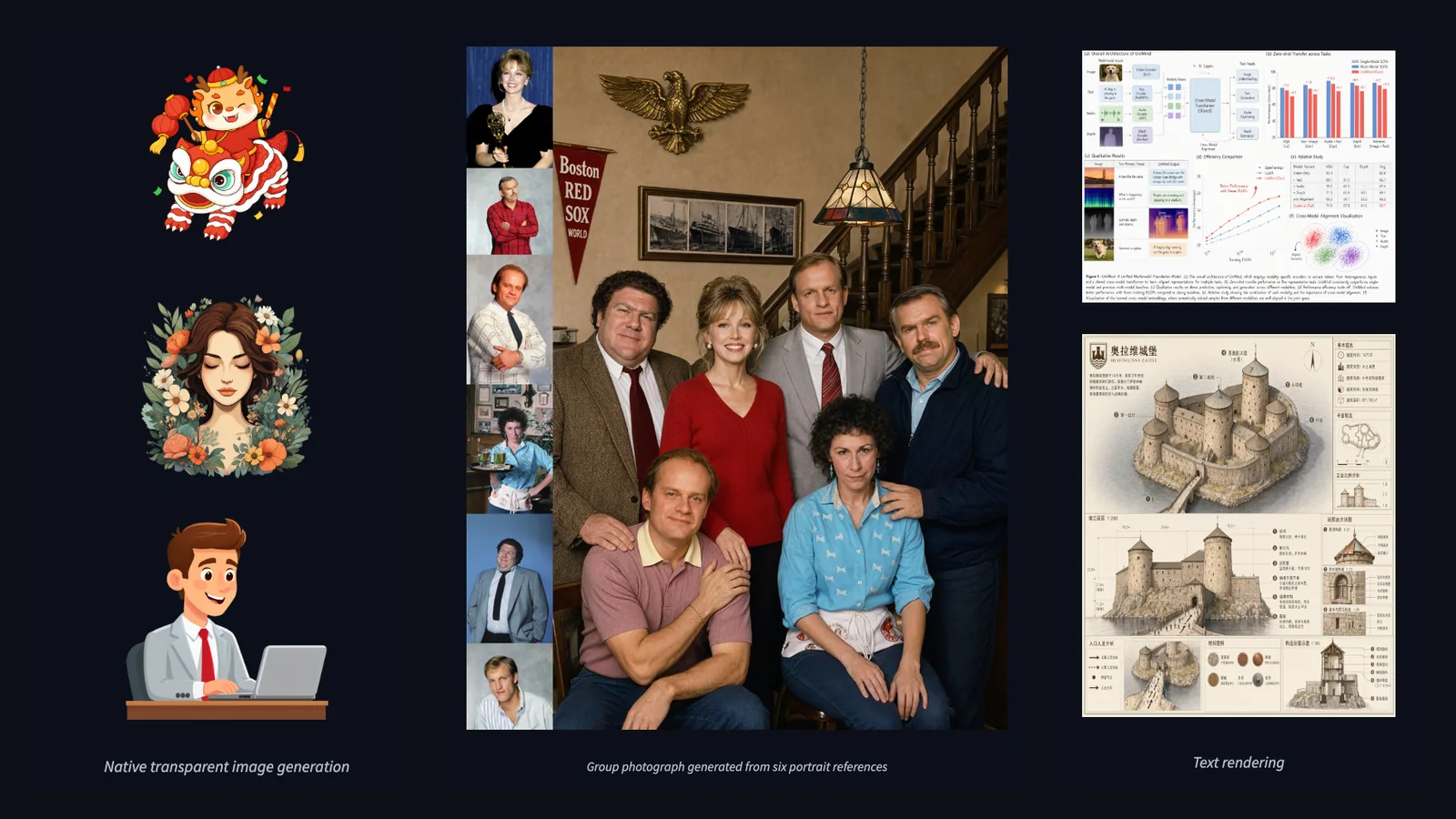
Qwen-Image-2.1 generates and edits images with one set of downloadable weights, including transparent PNGs and edits with several reference images. It is worth evaluating for local creative workflows if you can manage GPU memory and setup. The weights use the Qwen Research License; commercial use needs a separate license.
Content reviewed:
Use this model
Online access and trials
- Try the official Qwen demo
Availability and signup terms are set by the provider.
API docs and console
- Alibaba Model Studio image API model list
Provider account and usage billing apply.
Official model repository
- Qwen model card and Diffusers examples
Model card, downloads and license conditions.
Local tools and guides
- TheTechnoX’s 16 GB ComfyUI generation and edit examples
Follow the tool’s installation and hardware requirements.
- vLLM-Omni image and audio serving
Follow the tool’s installation and hardware requirements.
- ComfyUI templates and model downloads
Follow the tool’s installation and hardware requirements.
What can you do with Qwen-Image-2.1?
- Create illustrated concepts, posters and layouts from text, then check small lettering and object details at the intended display size.
- Edit a photograph using instructions, masks or marked regions; combine up to 10 reference images to specify people, objects and changes.
- Generate transparent assets or extract a subject into an RGBA image for further compositing.
Qwen Image 2.1 Turbo and Pro: hosted prices and weights
For a hosted workflow, Alibaba Cloud Model Studio provides qwen-image-2.1-turbo and qwen-image-2.1-pro. Both accept text and image input and return images. Their model pages list original API prices, excluding limited-time promotions.
In Singapore (international scope), Turbo is $0.016 per image and Pro is $0.04. In Beijing and the listed global regions—Virginia, Frankfurt, Tokyo and Hong Kong—the pages show $0.014133 and $0.035333 respectively. At Singapore rates, 1,000 images cost $16 with Turbo or $40 with Pro. In the other listed regions the corresponding totals are $14.133 and $35.333. Use the endpoint and billing scope for your account; do not treat a regional quote as a worldwide price.
The downloadable Turbo checkpoint is Qwen/Qwen-Image-2.1-Turbo. Its saved sampling schedule uses eight steps with CFG 1; changing num_inference_steps alone does not replace that saved schedule. The model card gives generation and editing examples and the supported aspect-ratio presets. This is a distinct checkpoint from the base model’s 40-step examples.
Turbo weights use the Qwen Research License Agreement. Downloadable weights do not establish unrestricted commercial permission; review the exact checkpoint license before incorporating the weights into a commercial workflow. Hosted API use follows the service terms.
| Model Studio route | Turbo per image | Pro per image | 1,000 images Turbo / Pro |
|---|---|---|---|
| Singapore · international | $0.016 | $0.04 | $16 / $40 |
| Beijing; listed global regions | $0.014133 | $0.035333 | $14.133 / $35.333 |
Qwen-Image-2.1 on consumer GPUs: reported setups
Laxmi Kant Tiwari published a single-RTX-5090 test with Diffusers on Windows, seed 11 and 40 steps. Both the transformer and encoder were quantized; the VAE kept its original precision. All weights stayed on the GPU with no CPU offload, and there was no BF16 baseline.
The two-reference edit reached 25.6 GB peak in FP8 and 19.1 GB in NF4. These are 32 GB-card measurements, not a verified 24 GB-card result. Reference editing needs more memory than the same-size text-to-image run.
TheTechnoX separately reported a ComfyUI run on a 16 GB RTX 4060 Ti, using INT8 ConvRot image weights, an INT8 Qwen3-VL encoder and BF16 VAE without CPU or disk offload. The author reported roughly 20 seconds for generation and about a minute for editing, but did not specify resolution or steps. Use the post’s examples to judge the task and keep those missing settings out of a timing comparison.
| RTX 5090, 40 steps | FP8 | NF4 |
|---|---|---|
| 1024×1024 peak VRAM | 21.3 GB | 15.2 GB |
| 1024×1024 time | 19.3 s | 19.2 s |
| 2048×2048 peak VRAM | 22.6 GB | 15.4 GB |
| 2048×2048 time | 115.7 s | 118.8 s |
Generation, editing and transparent output
The exact checkpoint is Qwen/Qwen-Image-2.1. Its visual generator has about 7B parameters, with a separate vision-language encoder and VAE in the pipeline. That 7B figure describes the generator, so it is not enough to estimate the memory needed by the whole application.
The official Diffusers examples use 40 steps and recommend 2048×2048 for square images, with other 2K aspect ratios available. They use the same pipeline for text prompts, image editing and RGBA generation. For transparent output, describe the subject and the transparent background explicitly, then save a PNG to retain the alpha channel.
For visual ideas, the independent Qwen Image 2.1 gallery gathers creator-attributed previews across photography, typography, illustration and editing. Check the original post for the inputs and steps behind an example. Qwen-Image-2.1 edits still images; a moving showcase clip involves a separate video step.
Start a local ComfyUI workflow
In a current ComfyUI installation, search the Template Library for Qwen-Image-2.1 and open Text to Image. The official tutorial also provides Image Edit and Remove Background workflows. Download the exact components selected by the template: generator files go in models/diffusion_models, the encoder in models/text_encoders, and the VAE in models/vae. Choose the matching BF16 or INT8 files from the tutorial.
For a first run, choose a square canvas at about 1.0 MP and keep one output. The current ComfyUI templates use 25 steps, CFG 1, Euler and the simple scheduler. These settings differ from the 40-step Diffusers example and SGLang timing below. A 4.0 MP square canvas is approximately 2048×2048.
For an edit, load your own image in the first reference slot and state what to preserve as well as what to change. The prompt below uses ComfyUI’s reference syntax. Start with one reference before adding more.
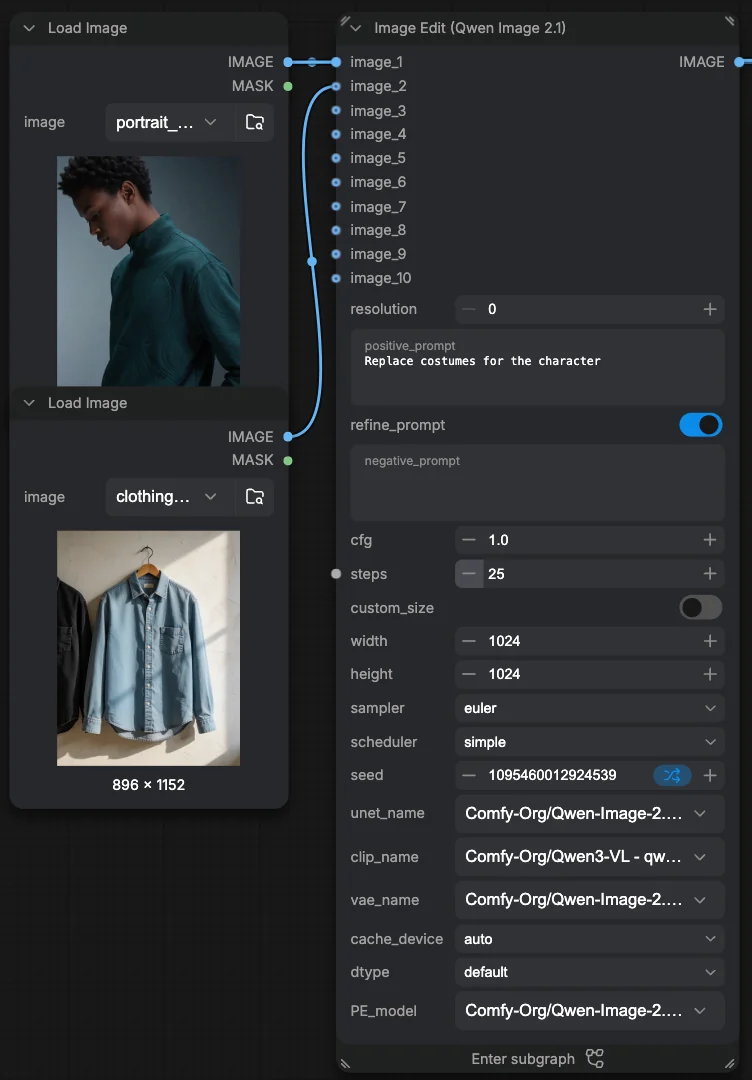
In <image1>, keep the mug, its handle and its printed lettering unchanged.
Replace the table with pale wood and the wall with a soft blue background.
Keep the original camera angle.
ComfyUI templates and model downloads ↗
Open the tutorial for the component downloads, workflow files and reference-image controls used above.
Qwen-Image-2.1 official GitHub repository ↗
Read the model release notes, examples and license alongside the downloadable checkpoint.
SGLang deployment recipes ↗
For a local HTTP service on Linux with NVIDIA CUDA, select your GPU and workload in the recipe picker before copying the server command.
Download the matching official Turbo components
Comfy-Org provides full Turbo weights as qwen_image_2.1_turbo_bf16.safetensors or qwen_image_2.1_turbo_int8_convrot.safetensors. Alternatively, load the base model with its extracted qwen_image_2.1_turbo_lora_avg_rank_178_bf16.safetensors adapter. Choose one route, with the matching Qwen3-VL encoder and VAE, and use eight steps with CFG 1. Do not add the extracted adapter again to full Turbo weights. This official recipe is separate from a community four-step acceleration LoRA.
Add a LoRA for a specific editing task
For exposure correction, prithivMLmods’ Natural Exposure LoRA is an experimental adapter for Qwen/Qwen-Image-2.1. Load it with the base model and an input image, then use the trigger “Transform the image with balanced neutral exposure”. Compare fine detail and strong color casts with the original. Its card follows the base model’s Qwen Research License.
Replace the VAE for cleaner textures and FP16 decoding
madebyollin’s Texture-Fix VAE is an unofficial Qwen-Image-2.1 VAE fine-tune. The September 24 release targets checkerboard textures; the October 5 update also addresses FP16 NaNs, especially around transparent regions. The author reports 75 NaN-producing inputs with the original VAE versus zero with the replacement across 185 stress-test inputs. Those are the author’s tests, not a new timing or quality measurement for the calculator profile.
Download texture_fix_vae_for_qwen_image_2.1_bf16.safetensors into ComfyUI/models/vae and select it in Load VAE. Pin the repository revision used by your workflow: the October update rescales decoder and encoder weights, so instructions written for the initial release do not necessarily describe the current files. The fine-tune retains the Qwen Research License for non-commercial research use.
hf download madebyollin/texture-fix-vae-for-qwen-image-2.1 \
  texture_fix_vae_for_qwen_image_2.1_bf16.safetensors \
  --revision 9a10df811f183323e4e94d255c18add1924ce340 \
--local-dir ComfyUI/models/vaeChoose quantized components for your runtime
Unsloth’s Qwen-Image-2.1-GGUF is a third-party quantization of the base denoiser for Unsloth Desktop and stable-diffusion.cpp. It still needs the separate VAE and Qwen3-VL encoder named in the author’s guide. The card lists qwen-research licensing. Start with the complete component recipe, then measure peak memory for your resolution and reference count; a denoiser download size is not the pipeline’s running VRAM.
Keep quantization and few-step distillation separate when choosing files: a base GGUF changes numerical precision, while a Turbo-merged GGUF also includes a distilled adapter and needs its own schedule. Use the author’s matching loader and workflow rather than substituting a file into the 40-step cost profile.
Use a few-step LoRA for faster iteration
Viggle Turbo v0.3 is a third-party distilled LoRA for Qwen/Qwen-Image-2.1, supporting generation and edits with 1–3 references. Its six-step recipe requires the supplied sigmas, scheduler, CFG 1, no negative prompt and unmerged LoRA at strength 1. The author pins Diffusers commit 80c7ed2 (full pin in its install instructions), Transformers >=5.17,<6 and PEFT; the ComfyUI workflows were tested on 0.37.0. Use its custom nodes. Turbo-merged INT8, FP8 and GGUF files already contain the adapter; avoid adding it twice.
Viggle’s nine-step Diffusers/demo option runs seven Turbo steps and two base-model steps for finer detail; its ComfyUI and merged-file workflows use six steps only. Small text and complex edits can lose accuracy. Compare usable results with the base workflow before changing your cost assumptions. The derivative retains Qwen Research License terms, with a separate commercial license required.
Alibaba PAI’s Fun-Acc LoRA is another derivative adapter for the same base, with a four-NFE recipe and qwen-research terms. Use its bundled qwenimage21_pdd.py and lora_utils_pdd.py, or the matching VideoX-Fun QwenImage21Pipeline. The author reports weaker dense text and some blurrier, darker edits. Measure the complete workflow on your GPU to compare elapsed time.
How fast is Qwen-Image-2.1 on an RTX 4090?
SGLang reports the following RTX 4090 24GB measurements from September 20, 2026. Both use 1024×1024, 40 steps, CFG 1 and one RGBA PNG per request. The DiT and VAE stay on the GPU; encoder layers are offloaded to the CPU, with FlashAttention and native precision.
These are median HTTP times after warmup, including PNG serialization and excluding startup. The sampled peak is 22.7 GiB of VRAM; CPU offload also needs host RAM. They describe this runtime and workload, not a general time for native 2K output.
Multiple references, more outputs and batching can change component placement. More offloading trades GPU memory for transfers, and quantization and transfer overhead both affect inference speed. If your local run is slow, compare resolution, steps, reference count and placement with the measured recipe first.
| RTX 4090 workload | Reported request time |
|---|---|
| Text to image | 18.68 seconds |
| Single-image editing | 21.68 seconds |
Estimate the cost of local generation
Use cost per usable image when comparing a local workflow with an API. A useful starting calculation is GPU hourly cost × seconds per image ÷ 3,600. At an illustrative $1 per GPU-hour, 18.68 seconds costs about $0.00519 per attempt, or $5.19 for 1,000 attempts. At 21.68 seconds, the same calculation gives about $6.02 for 1,000 edits.
That calculation covers active processing time only. Add model loading, idle rental time, storage and setup work for a rented server. For a GPU you own, include electricity and hardware cost. If only half of your attempts are usable, the processing cost per accepted image doubles.
The image calculator uses the existing 1024×1024, 40-step profiles. Choose generation or editing and enter your expected monthly volume. For a different workload, measure its time and use the formula above; the calculator does not accept custom timing inputs.

Local Qwen, FLUX.2 Klein or a hosted image API?
Local Qwen is a useful evaluation route when you want control over files, reference images and a reusable editing workflow. A hosted API is a practical alternative when maintaining that environment costs more time than the images save. Choose using the same prompts and source images, including the edits you expect to repeat.
FLUX.2 Klein 9B is another downloadable generation and multi-reference editing model. Its released distilled version uses four inference steps and has a non-commercial license. Compare it for short iteration cycles using the same prompts and output size on your GPU.
| Option | Reason to evaluate it | Cost or access condition |
|---|---|---|
| Qwen-Image-2.1 locally | RGBA assets and reference-guided edits in your own workflow | GPU, RAM and setup; separate license for commercial use |
| FLUX.2 Klein 9B locally | Four-step generation and multi-reference editing | Local hardware; FLUX Non-Commercial License |
| Gemini 3.1 Flash Image API | Hosted generation without maintaining a local inference server | Metered API billing; provider access and usage terms |
A hosted API budget to compare with
As of September 29, 2026, Google lists standard Gemini 3.1 Flash Image output at approximately $0.067 per 1K image, or about $67 for 1,000 images. Text and image inputs cost $0.50 per million tokens; text and thinking output, when present, costs $3 per million tokens. These additional charges sit outside the image-output subtotal. This is an alternative model’s API budget, not a Qwen-Image-2.1 price.
For Alibaba Model Studio, choose the documented Turbo or Pro route and its billing region from the hosted-price section above. Keep those service rates separate from the downloadable base model’s local workload.
For occasional work, compare the API bill with the time spent installing, updating and troubleshooting local software. For a repeatable high-volume workload, measure accepted outputs per hour and include idle capacity before deciding whether self-hosting saves money.
Check the outputs that matter to your work
Build a small comparison set from your own work: one layout with exact text, one photograph edit, one identity-preserving reference task and one transparent asset. Keep the target dimensions fixed. Record request time, attempts needed and the reason you reject each result.
Inspect lettering, hands, object relationships and the parts of an edited image that should stay unchanged. View transparent edges against both light and dark backgrounds. A fast first image saves little if it takes several retries or extensive cleanup to become usable. Choose a hosted alternative if it consistently gives you more acceptable results within your time budget.
Qwen-Image-2.1 license and commercial use
The Qwen Research License defines non-commercial use as research or evaluation. Commercial use of the materials requires a separate license from Qwen; the license document gives the contact route. Resolve that requirement before building a paid workflow around the downloaded weights.
Self-hosting gives you control over the runtime, while the model license and applicable laws still govern its use.
Before you use it
- The 1024×1024 timing sample cannot price a 2K or multi-reference workload without a new measurement.
- Downloading a quantized checkpoint changes the runtime requirements; use components supported by the workflow you selected.
How to get started
Try a representative task in the official demo, then use the ComfyUI tutorial for a local evaluation. Use the matching image calculator profile for the reference workload and the cost formula above for your own measured timings.
Sources
Sources (20)
- Community Texture-Fix VAE, tests and October 5 update ↗
Source checked:
- Comfy-Org full Turbo weights and extracted LoRA ↗
Source checked:
- Turbo regional prices ↗
Source checked:
- Pro regional prices ↗
Source checked:
- Turbo checkpoint and Research License ↗
Source checked:
- Natural Exposure LoRA author card ↗
Source checked:
- Unsloth GGUF author card ↗
Source checked:
- Viggle Turbo author card ↗
Source checked:
- Alibaba PAI Fun-Acc author card ↗
Source checked:
- Tiwari’s RTX 5090 measurements ↗
Source checked:
- TheTechnoX’s 16 GB ComfyUI examples ↗
Source checked:
- Independent Qwen Image 2.1 creator gallery ↗
Source checked:
- Official Qwen-Image-2.1 GitHub repository ↗
Source checked:
- Official model card ↗
Source checked:
- Checkpoint license ↗
Source checked:
- SGLang runtime example ↗
Source checked:
- ComfyUI native workflows ↗
Source checked:
- FLUX.2 Klein 9B model card ↗
Source checked:
- Google Gemini API pricing ↗
Source checked:
- Alibaba Model Studio image API ↗
Source checked:
Calculators
Using this calculator for this model
Choose the image task, output size and step count that match your typical generation or editing request. Use the hardware and pricing comparison for that configuration.
How to fill in the calculator
- Deployment
- Local estimates use hardware ownership, electricity and operations; cloud estimates use hourly rental pricing. Compare the path you are considering.
- Usage level
- Choose 120, 360 or 720 active hours per month, based on your planned schedule. For bursty work, use the nearest level as a comparison.
- Output size
- Use the resolution or output size typical for your jobs; larger outputs may change the mapped compute price.
- Steps
- Use the number of inference steps in your usual workflow. Higher step counts can increase run time and cost.
Use the calculator for a deployment budget; enter your expected usage and measured wall power.