
OpenAI Decisions API: Pricing and When to Use It
OpenAI Decisions API turns text, images and JSON into a probability, a category or a rubric score. Use it when your application knows the possible answers: routing a ticket, sorting a queue or flagging a photo for review. It launched in public beta on October 6, 2026 and became generally available on October 22. It uses gpt-6-luna through /v1/decisions, with input-only billing.
Content reviewed:
Use this model
API docs and console
- Open the Decisions API guide
Provider account and usage billing apply.
Which tasks fit a decision endpoint?
- Route a support ticket to a defined queue, with a human-triage option for cases that cross team boundaries.
- Flag product photos for inspection using a specific visible condition, such as a damaged connector.
- Prioritize a backlog with named severity levels and examples that distinguish adjacent levels.
Use general Luna for generated replies and tools
GPT-6 Luna also has a general Responses API route for text generation and tool workflows. That route has separate input, output and cache prices; use the general model guide when the task needs a written answer rather than a fixed decision.
Compare with Perplexity Decider v1.1
When moving an OpenAI Decisions request to Perplexity Decider v1.1, translate the input and question array into state and a named questions object. Keep the same labels and rubric, then validate the returned probabilities and review thresholds. Its guide covers the request format and reported input usage you need to compare the complete routing bill.
Choose a probability, category or score
A predicate estimates whether a condition is true. Choice selects from your supplied options. Score returns a probability-weighted average over your ordered levels, so the value can fall between them. Choice and score include distributions and a separate confidence field; the response can also contain a refusal for an individual question.
For a support queue, keep department and urgency separate. A billing question can be urgent or routine. Combining those concerns into one label makes the result harder to use and the mistakes harder to diagnose.
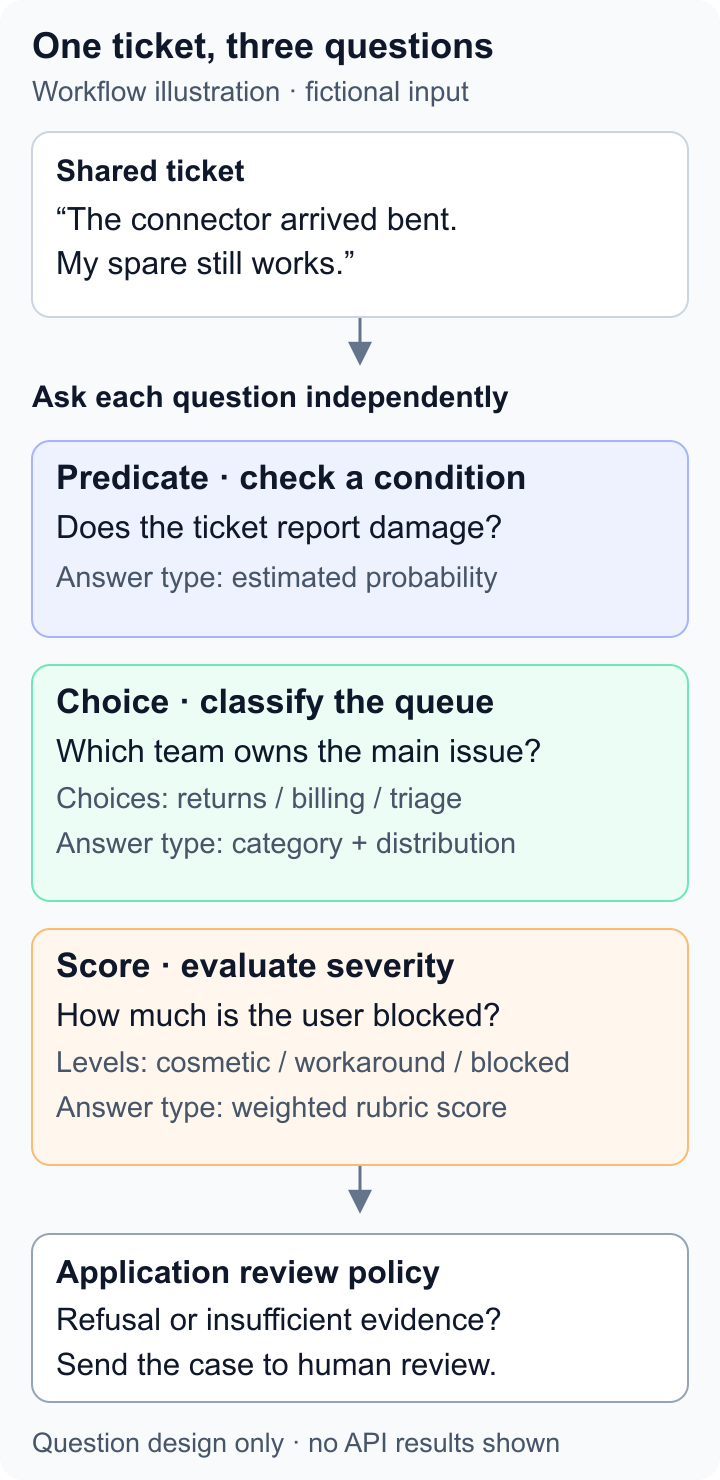
| Output | Example question | Application step |
|---|---|---|
| Predicate | Is the connector visibly bent? | Send likely damage to an inspector |
| Choice | Which team owns this ticket? | Select a queue |
| Score | How urgent is this interruption? | Order work against a written rubric |
Make a first routing request
Set OPENAI_API_KEY in your server environment and send this request. It uses a made-up ticket, so you can inspect the response before connecting real customer data. Find the answer named queue in answers, handle refusal before reading choice, and keep usage.input_tokens with your cost record.
Start with a few tickets whose destinations your support team has already agreed on. Include a login problem that also mentions payment, and one message with too little detail. Inspect both the chosen queue and its alternatives before enabling automatic routing.
curl https://api.openai.com/v1/decisions \
  -H "Authorization: Bearer $OPENAI_API_KEY" \
  -H "Content-Type: application/json" \
  -d '{
    "model": "gpt-6-luna",
    "input": "After changing my password I cannot sign in. My invoice looks correct.",
    "questions": [{
      "type": "choice",
      "name": "queue",
      "instructions": "Choose the team responsible for resolving the main problem.",
      "choices": [
        {"value": "account", "description": "Sign-in and account access problems"},
        {"value": "billing", "description": "Incorrect charges or invoices"},
        {"value": "triage", "description": "Unclear requests or problems outside these teams"}
      ]
    }]
}'Prepare images and handle every question’s refusal
The generally available endpoint supports GPT-6 Luna and accepts a text string or an ordered conversation containing text, images and JSON. Supply images as inline Base64 data URLs or publicly accessible HTTP(S) URLs; file IDs are not accepted. User messages can combine those formats, developer messages accept text, and function or custom tool calls and outputs can supply evidence. Files, audio and item references are unsupported.
Inspect each question’s answer type before taking an action. One request can succeed while an individual question returns a refusal. Keep a fallback for refusals, missing evidence and cases whose consequences require a reviewer. A high probability needs validation against labeled examples before you use it as an automatic-action threshold.
What the available latency example measures
OpenAI describes Decisions as up to ten times faster than generating equivalent decisions. That is a vendor claim about its comparison, rather than a latency guarantee for every request.
A Classmethod walkthrough sends one support ticket with three questions per request, repeating the request five times. It reports a median 0.255 seconds and 406 input tokens, for an estimated $0.0000406 per request at the base rate. This small example demonstrates the endpoint and a token-based cost calculation; it does not measure accuracy across a ticket queue or calibration at a high-confidence threshold.
For your own router, retain the agreed destination, answer distribution, refusal status and elapsed time for each case. Compare errors above and below the proposed threshold. Include mixed-topic messages and missing details so a narrow, easy test set does not hide cases that need triage.
What does a batch of decisions cost?
The Decisions-specific uncached input price checked October 27, 2026 is $0.10 per million tokens, with no output fee. Cache reads and cache writes use the standard GPT-6 Luna rates. This tariff applies to /v1/decisions; other GPT-6 Luna endpoints have their own pricing.
At that base rate, 100,000 requests averaging 1,000 billed input tokens total 100 million tokens and cost $10.00. If each request averages 5,000 tokens, the bill becomes $50.00.
Use billed input from the response rather than counting just the customer message. Keep retries and later generation calls in the same workflow budget. Image inputs need their own token estimate; a text-only average is not an image-price quote.
| Assumed workload at base rate | Input tokens | Calculated USD |
|---|---|---|
| 100,000 requests × 1,000 tokens | 100 million | $10.00 |
| 100,000 requests × 5,000 tokens | 500 million | $50.00 |
| First workload with 10% additional billed attempts | 110 million | $11.00 |
Long context and regional processing change the rate
Above 272,000 input tokens, the input multiplier is 2× for the full request. Regional processing adds 10% where applicable. Applied to the Decisions base input rate, those are $0.20 per million for long context, $0.11 for regional short context, or $0.22 when both apply. The Decisions endpoint still has no output charge.
For an illustrative request with 300,000 billed input tokens, the long-context input cost is $0.06, or $0.066 with regional processing. A short ticket router and a full-document classifier therefore need different budget assumptions.
Choose by the work your application must finish
Use Decisions when the next step is selecting, filtering or ordering. If a customer also needs a written reply, budget a generation step after routing. GPT-6 Luna supports built-in tools and function calling through Responses, which is the more appropriate starting point for a workflow that must call tools and compose an answer.
Compare Liquid d1 and Jev on the same labeled requests if you are choosing a hosted decision service. Read the Clef guide if you also want to evaluate self-hosting. Include input preparation, retries and any explanation call when comparing cost per accepted decision.
For example, if a trial costs $11 across all attempts and produces 90,000 decisions your reviewer accepts, its API cost per accepted decision is about $0.000122. Record how the remaining 10,000 cases were handled. A router that cheaply sends difficult cases to the wrong team can create much more work than it saves.
Before you use it
- Keep refusals and ambiguous answers on an explicit fallback path before a decision can trigger an action.
- The Decisions endpoint and GPT-6 Luna model are hosted services; their API spend is not a local GPU estimate.
How to get started
Try the routing request with a small labeled set, agree which errors need human review, and budget from the input usage of the complete workflow.
Sources
Sources (5)
- Classmethod Decisions walkthrough and timing ↗
Source checked:
- OpenAI Decisions beta release and October 22 general availability ↗
Source checked:
- OpenAI Decisions guide, availability and endpoint pricing ↗
Source checked:
- OpenAI Decisions request and answer schemas ↗
Source checked:
- GPT-6 Luna context pricing and endpoint capabilities ↗
Source checked: