
Jev 1.13: API Pricing for Decision Workloads
Jev 1.13 is a TypeSafe AI decision model for turning text into categories, ratings and yes/no probabilities. It fits workflows such as ticket routing, content review and relevance filtering. You use it through a hosted API; its fixed model ID is jev-1.13.0.
Content reviewed:
Use this model
Online access and trials
- Try Jev in the Playground
Availability and signup terms are set by the provider.
API docs and console
- Follow the Playground and API quick start
Provider account and usage billing apply.
What can you build with Jev?
- Support triage: assign a ticket to a predefined team, rate its urgency and flag whether it needs a person to review it.
- Content review: score an article against an editorial rubric, then use the result to prioritize the review queue.
- Relevance filtering: assess whether a document answers a particular question before passing it to a writing or research step.
Jev 1.14 preview and experimental image decisions
Jev 1.14 became available on October 14. The fixed ID jev-1.13.0 still selects this page’s version; jev-latest currently points to 1.13 and jev-preview to 1.14. Both cost $0.042 per million input tokens, with free output.
Both versions can accept images with TypeSafe-Danger-Zone-Images: true. Supply image assets and reference them from the state, instructions or criteria using the documented request format. TypeSafe describes images and Box as prototype features whose answers and limits can change.
Box questions require 1.14 and return four normalized edges around a target. A box is returned even when the target is absent: ask a Noul existence question alongside it and ignore the box when that answer is low. A returned rectangle alone is not evidence that the object is present.
Choice, Score or Noul: which output do you need?
Start with the decision your software needs to make. Choice selects from named options. Score places an input on an ordered scale. Noul gives the probability of a yes answer. All three evaluate the state you supply, using your instructions and, for Choice and Score, a defined set of criteria.
For example, a support workflow could ask which team owns a ticket, how urgent it is and whether it mentions a refund. Those are three different questions, so give each its own output type and criteria.
| Type | Result | Example question |
|---|---|---|
| Choice | Selected option, option probabilities and confidence | Which team: billing, delivery or technical support? |
| Score | Position on an ordered scale, level probabilities and confidence | How urgent: routine, time-sensitive or service-blocking? |
| Noul | A yes probability from 0 to 1 | Does this ticket explicitly request a refund? |
When to choose Jev, code rules or a generative model
Use code when the decision follows an exact rule: checking an order number, comparing dates or adding invoice amounts. Consider Jev when the answer depends on the meaning of text, such as whether a customer is asking for a refund without using that exact word.
Use a generative model when the required output is a reply, summary or explanation. A support application can combine all three: code checks the order record, Jev classifies the message, and a generative model drafts a response for review. Choose based on the output your workflow needs, then evaluate it on representative cases.
Try your first decision in the Playground
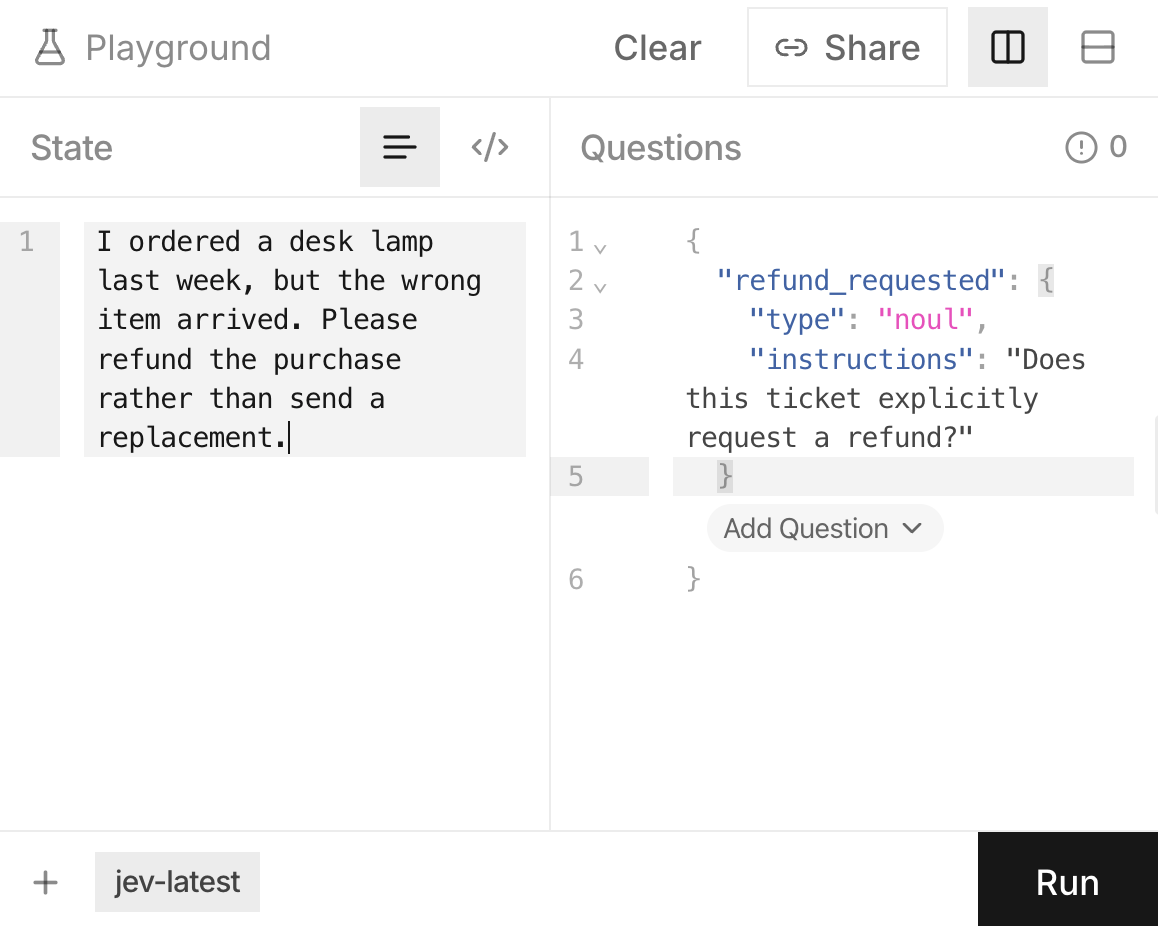
Sign in to the TypeSafe console and open the Playground. For a first Noul question, paste this fictional ticket into State: “The headphones arrived with a cracked earcup. Please return the payment to my card; I do not want a replacement.” In Questions, add a Noul question with the instruction: “Does the customer explicitly request a refund?” The API example below uses this same text and question.
The built-in walkthroughs cover all three output types. For a routing question, start with a small set of teams and describe what belongs in each one. The Playground starts with jev-latest; use the fixed ID when moving your evaluation into the API.
Run several ordinary cases and a few ambiguous ones. Compare the answers with the decisions you would make, then revise overlapping labels or unclear instructions. Once the question behaves usefully, carry the same state and question structure into your application through the System One API.
Connect Jev to your application
Create an API key in the TypeSafe console and set it as TYPESAFE_API_KEY in your local environment. Run the request below from a terminal, or send its JSON body to POST https://api.typesafe.ai/v1/systemone with the same headers. Keep the key on your server when integrating a web application.
The questions object uses your own question IDs as keys. In the response, read answers.refund_requested.noul for the yes probability, model for the version that answered, and usage.input_tokens for the billed input count. The example pins jev-1.13.0. The jev-latest and jev-preview aliases can move to another release, so record the returned model ID when evaluating them.
Questions in one request share the same state and are evaluated independently. After adding Choice and Score questions to the ticket example, your code can combine the selected team, urgency rating and refund probability into a routing rule. If a later question depends on an earlier answer, send a separate request with that answer included in its state.
Keep action rules in your application: deciding a queue, asking for a review or preparing a reply are separate steps. A generative model can write the reply after Jev has supplied the decision.
For integrations beyond the official SDKs, the independent Jev AI Tools directory lists community clients, agent tools and demos. Jev Ultrafast is one source-available example: it uses Jev to choose a browser operation and target while a separate model writes text for form fields. Check the project’s supported API version before using it in an application.
curl https://api.typesafe.ai/v1/systemone \
  -H "Authorization: Bearer $TYPESAFE_API_KEY" \
  -H "Content-Type: application/json" \
  --data-binary @- <<'JSON'
{
  "model": "jev-1.13.0",
  "state": "The headphones arrived with a cracked earcup. Please return the payment to my card; I do not want a replacement.",
  "questions": {
    "refund_requested": {
      "type": "noul",
      "instructions": "Does the customer explicitly request a refund?"
    }
  }
}
JSON
Community Jev tools and project directory ↗
Browse independent integrations and demos, then open each project for its setup and maintenance details.
Jev Ultrafast browser agent on GitHub ↗
Inspect a browser agent that asks Jev to select bounded actions from observed page controls.
Python and JavaScript / TypeScript SDKs ↗
Use the official SDKs for typed questions and answers, or call the HTTP endpoint from another language.
Python integration guide ↗
Examples for the typesafe-sdk package cover synchronous and asynchronous calls, model selection and answer handling.
TypeSafe skill for coding agents ↗
Give a coding agent the official API patterns and question-design guidance when building a Jev integration.
Turn model answers into useful rules
Choice and Score include confidence, which describes how concentrated their output distribution is. Noul returns a yes probability instead. A high-confidence Choice answer can select any option; it does not mean yes. A Score is a position on your rating scale, not a probability.
Choose thresholds using examples from your own workflow. For a refund flag, compare missed requests with unnecessary reviews and choose the tradeoff your team can handle. Send uncertain or costly decisions to a person. Keep a set of representative cases to rerun when changing the question, criteria or model version.
How Jev API pricing works
As of October 16, 2026, Jev 1.13 costs $0.042 per million input tokens ($42 per billion). Output tokens are free. Input includes the state and every question in a request. The official model table below is the source for this rate.
For a planning example, 10,000 requests averaging 2,000 input tokens each use 20 million tokens and cost $0.84 at that rate. Include your question text in the average, along with any repeated calls or retries. Use usage.input_tokens from your responses to replace the assumed average with your own measured usage.
When several independent questions concern the same document, sending them together avoids resending that state in separate requests. By default, Jev 1.13 allows 64k tokens across the state and all questions, with a separate 32k limit on the state plus the longest question. Sending TypeSafe-Danger-Zone-Long-Context: true raises both limits to 262k, at the same token rate; TypeSafe reports slower and less accurate behavior beyond the defaults. Keep unrelated material out of the state to leave room for the questions that matter.
Need open weights or self-hosting? Compare Laya
Laya is an Apache-2.0 open-weight family for Choice, Score and Noul decisions. Its server exposes a Jev-compatible /v1/systemone endpoint, and you can run or fine-tune it in your own environment. Check context limits, option budgets and confidence thresholds before moving a workflow between the two models.
Use the Laya guide for checkpoint selection and a local request example. The decision calculator compares your measured Laya capacity and infrastructure quotes with Jev API charges at your assumed request volume.
Before you use it
- Use Jev for typed decisions. Images require the experimental image header and request format; audio and video need text or structured preprocessing. Free-form response generation uses a separate model.
- Handle exact arithmetic, counting and date comparisons in code. TypeSafe lists these, along with indirect instructions, among Jev 1.13’s weaker areas.
- Text supplied by users can try to influence the decision. Include adversarial examples in your evaluation before using the result to authorize a sensitive action.
How to get started
Start with the refund example above, then replace it with one recurring decision from your workflow. Keep the cases where the answer changes your next action; use them to evaluate future question and model updates.
Sources
Sources (13)
- Experimental image request format ↗
Source checked:
- Box questions and absent-target behavior ↗
Source checked:
- Independent Jev AI Tools project directory ↗
Source checked:
- Jev Ultrafast open-source browser agent ↗
Source checked:
- Official models, pricing and limits ↗
Source checked:
- Playground and API quick start ↗
Source checked:
- Choice, Score and Noul outputs ↗
Source checked:
- Confidence and probabilities ↗
Source checked:
- Official SDKs ↗
Source checked:
- Python SDK guide ↗
Source checked:
- Official coding-agent skill ↗
Source checked:
- Official Playground (sign-in required) ↗
Source checked:
- Known Jev 1.13 limitations ↗
Source checked: