
llama.cpp: run and budget a local GGUF model
Build llama.cpp v1.0, serve a local GGUF model and plan RAM, GPU offload and context memory. Compare complete running costs and API upgrade boundaries.
Last updated: 2026-11-15
llama.cpp is an MIT-licensed C/C++ inference library with command-line tools and a local model server. It runs supported GGUF models on CPUs and accelerated backends, with control over context size and GPU placement. Choose it when you want to inspect that configuration directly, embed inference in an application or expose a local API to a client.
The runtime has no per-token software charge. Downloaded models have their own licenses, and running them uses your machine’s memory, electricity and time. A GGUF file must contain an architecture supported by the selected build; the file extension alone does not establish compatibility.
What llama.cpp v1.0 changes for an integration
The November 13, 2026 release makes API and ABI incompatibilities visible through major-version changes for llama.cpp and ggml. Compatible features and backend or model additions use minor versions; fixes without API changes use patch versions. This matters most to applications linking libllama or ggml.
The v1.0 release also removes deprecated C API functions and promotes the NextN interface into the public header.
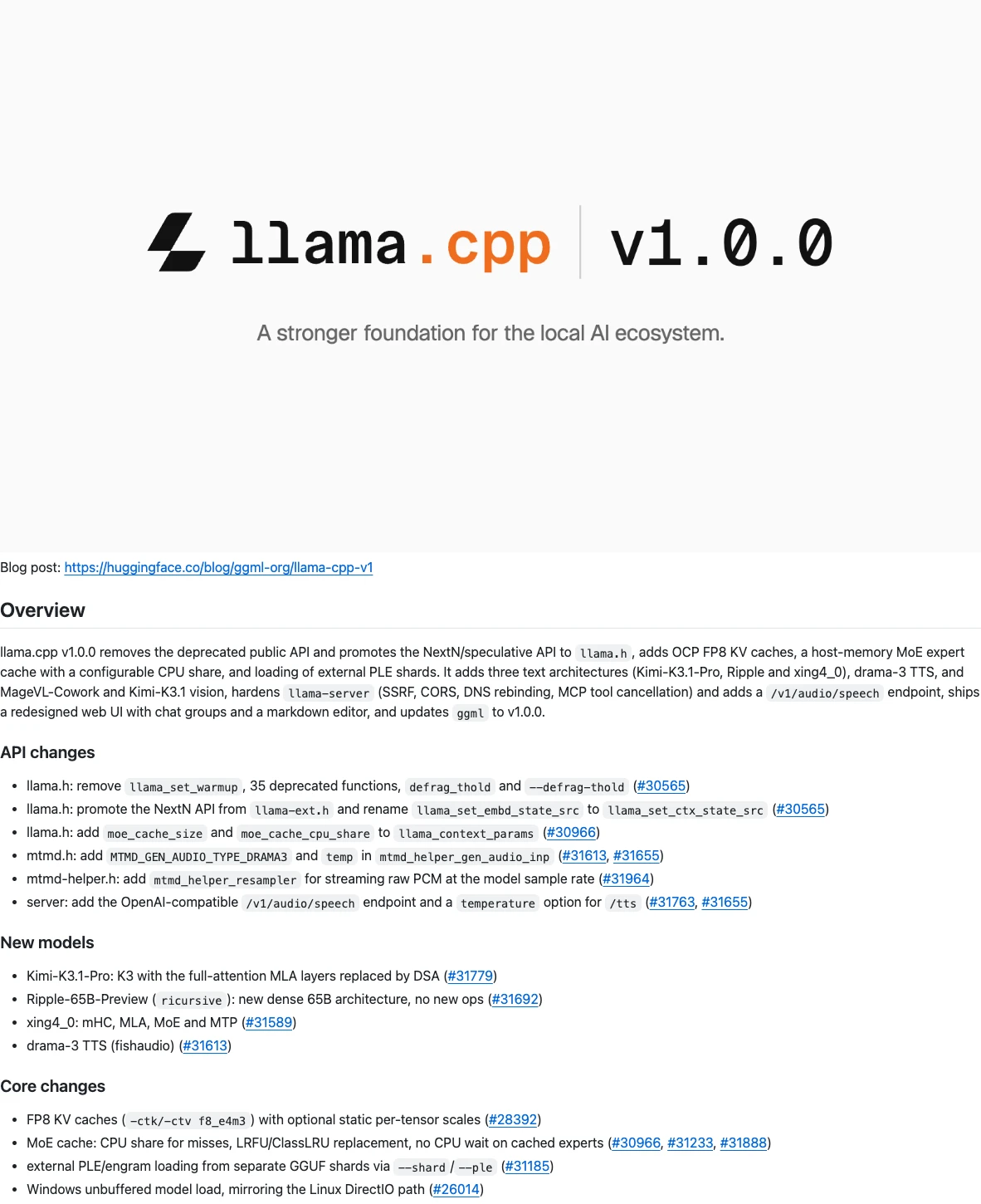
The official v1.0.0 release notes on GitHub, checked November 14, 2026.
Rebuild a binding against the matching headers and library, then exercise model loading and generation before replacing the deployed version. A daily build number and a library semantic version identify different release information; record both with a performance result.
For command-line use, pin a release and keep the original startup command. A model requiring a newer architecture implementation may need a later build even when an older release loads your other GGUF files. The v1.0 release notes list the API and model-support changes.
A CPU upgrade report shows where old scripts break
Philip Ndungu’s November 13 ComputingForGeeks test compares v0.9.0 build b12110 with the v1.0.0-associated b12359 on an Ubuntu VM with four AMD EPYC vCPUs, 16 GB RAM and no GPU. With Gemma 3 1B Q4_K_M, the newer server rejects the removed --defrag-thold argument before loading the model; the old build only warned. He also reports the libllama SONAME changing from .so.0 to .so.1.
Review service startup flags and native bindings before an upgrade. This author-run CPU test does not establish CUDA, Metal or large-model offload performance. Keep a working build and matching libraries available while validating the replacement.
Build llama.cpp for the machine you have
You need Git, CMake and a working C/C++ compiler. This example pins the v1.0.0 source and builds a Release configuration:
git clone --branch v1.0.0 --depth 1 https://github.com/ggml-org/llama.cpp.git
cd llama.cpp
cmake -B build -DCMAKE_BUILD_TYPE=Release
cmake --build build --config Release -j 4
./build/bin/llama-server --version
On Apple Silicon, the standard build enables Metal by default. For NVIDIA acceleration, install a compatible CUDA toolkit and configure a separate build directory with cmake -B build-cuda -DGGML_CUDA=ON -DCMAKE_BUILD_TYPE=Release, then build that directory. Windows multi-configuration generators can place the executable under build/bin/Release; use the path produced by your build.
The backend build guide covers CUDA, Metal, Vulkan, HIP and other supported paths. A binary built without your GPU backend will not gain acceleration just from an offload flag.
Serve a first GGUF model on localhost
First download a supported instruction-tuned GGUF model that fits the available memory, following that model’s license and artifact instructions. For example, the Clef guide covers its model-specific GGUF setup. Replace /absolute/path/to/model.gguf below with your actual file. The API alias is a local name you choose.
./build/bin/llama-server \
  -m /absolute/path/to/model.gguf \
  --alias local-model \
  --host 127.0.0.1 --port 8080 \
  -c 4096 -ngl 0
This starts a CPU baseline with a 4,096-token context. In another terminal, send one bounded chat request:
curl http://127.0.0.1:8080/v1/chat/completions \
  -H 'Content-Type: application/json' \
  -d '{
    "model": "local-model",
    "messages": [{"role": "user", "content": "Give three checks for a CSV parser."}],
    "max_tokens": 128,
    "stream": false
  }'
Inspect the startup log for the model, context allocation and backend. Then read the response and test whether it answers the prompt. Keep the server bound to localhost for this first setup. A remote deployment needs authentication and network access controls appropriate to its users.
The server reference documents request support and model aliases. Connect the LLM CLI or another compatible client to the server only after the direct request works.
Choose context and GPU offload together
The model’s weights, KV cache and working buffers all consume memory. On a PC, distinguish system RAM from VRAM; on an Apple Silicon Mac, the model shares unified memory with the operating system and other applications. Leave room for the workload, rather than filling the machine with a model whose download barely fits.
Version 1.0 adds FP8 KV-cache storage through -ctk f8_e4m3 -ctv f8_e4m3. These options change the cache precision, separately from the model’s GGUF weight quantization. Check support in your chosen backend and compare answer quality on your own prompts before using the setting for a longer context. The v1.0 release notes also describe the new MoE expert cache and external PLE/Engram shard loading; use a model-specific recipe for those placement options.

Where the model’s weights, KV cache and buffers sit as -ngl
changes. Original explanation of documented v1.0 options, not a measured
workload.
With an accelerated build, increase -ngl from zero to move more layers onto the GPU, checking startup allocation and the completed task each time. The v1.0 server accepts an exact number, auto or all. When allocation fails, reduce offloaded layers or context, or choose a smaller quantization. Partial offload can make a model usable while leaving CPU and memory bandwidth on the critical path.
Use the same model artifact, prompt and output budget when comparing configurations. Record loading time, prompt processing, generated tokens, elapsed task time and peak RAM/VRAM. A fast short answer does not establish that a long repository prompt or several concurrent conversations will fit.
Budget the whole local session
For an owned workstation, start with measured wall power and running hours. As an illustrative calculation, 200 watts for 40 hours is 8 kWh; at an assumed $0.20 per kWh, electricity costs $1.60. Add hardware depreciation, storage and any operational work relevant to the comparison. These assumptions are a budget example, not a measured llama.cpp workload.
For a rented machine, count the time the instance stays allocated. A $2/hour server kept available for three hours costs $6, including time spent loading, waiting and retrying. Divide by accepted work when comparing it with a hosted API. A lower price per generated token can still leave a poor result if the model needs repeated corrections.
Use the text cost calculator for supported model and hardware estimates and the cost methodology for the assumptions. For shared GPU serving, compare vLLM; for specialized Qwen MoE placement, read Strata. The local inference directory groups the available runtime guides.
Sources
Checked November 14, 2026: ggml-org v1 announcement, v1.0.0 release notes, pinned build instructions, pinned server reference and MIT license.