
Seedream 5.5: Image Editing, Access and API Cost
Seedream 5.5 is ByteDance Seed’s image-generation and editing model for repeated targeted changes, transparent assets and small text. ByteDance lists Jimeng, Doubao, Doubao Work and Volcengine Ark as rollout channels. The Paper reports about ¥0.28 for a 2K square image edit, with input and output image billing and free prompt text.
Content reviewed:

Use this model
Online access and trials
- Open the official Seedream 5.5 page
Availability and signup terms are set by the provider.
When should you try Seedream 5.5?
- Refine a product image, portrait or room scene over several targeted edit rounds.
- Create transparent visual assets for layouts, compositing and reusable design elements.
- Generate image concepts with small labels or dense text, then inspect the final lettering before delivery.
What changes in a Seedream 5.5 edit?
Seedream 5.5 is designed to keep parts of an image that a prompt did not ask to change. ByteDance’s launch demonstration follows one image through 100 successive edits, with each result used as the next input. It shows changes to clothes, accessories and objects while the person and surrounding scene remain consistent.
The practical use is a sequence of small changes: keep a product’s packaging and camera angle fixed, replace its background, then adjust a label or prop. Describe what should change and what should stay. When exact product details, a face or layout are important, compare the result against the original before accepting it.
The model also generates images with an alpha channel, including transparent and semi-transparent regions. That can make stickers, isolated objects and overlays easier to place in another design. The official release page demonstrates transparent assets, but your download path still needs to preserve alpha; place the saved file over both light and dark backgrounds to check it.
Where can you use Seedream 5.5?
ByteDance lists Jimeng, Doubao, Doubao Work and the Volcengine Ark experience center as rollout channels. In Jimeng, open Create and choose Generate or Canvas, then select Seedream 5.5. In Doubao, open image generation and choose the model. In Doubao Work, open Skills and choose Seedream 5.5. The announcement describes a staged rollout, so the model selector can differ by account.
For an Ark trial, open Visual Models → Image Generation in the experience center and select Seedream 5.5 if it appears. API access is rolling out separately; for a production call, use the model ID and request configuration shown for the enabled model in your Ark account.
Krea lists Seedream 5.5 in both Image and Edit. Select the model, add up to 10 reference images, and choose 1.5K or 2K output with auto, transparent or opaque background. Krea’s page lists a commercial license with paid plans. Krea deducts compute units from its subscription allowance; its model page does not specify how many units a Seedream 5.5 image consumes. Ark API billing is separate.
What does a Seedream 5.5 edit cost?
The Paper reported about ¥0.28 for a 2K square image-edit request. Its report describes two-part billing for the input and output images, with no charge for prompt text tokens. The amount is a reported example for that edit request, rather than a universal per-image rate.
At that reported amount, five successive edits would be about ¥1.40 and ten about ¥2.80 if every call matched the same 2K input-plus-output example. Each edit round is a separate call. Different image sizes, input counts, returned outputs and retries change the total; use the usage record for the enabled account when estimating a production batch.
Seedream 5 Flash is a separate hosted model with published provider rates. Compare that route when you need an already documented API option.
| 2K square edit requests | Approximate cost at ¥0.28 per request |
|---|---|
| 1 | ¥0.28 |
| 5 successive edits | ¥1.40 |
| 10 successive edits | ¥2.80 |
What do the published tests show?
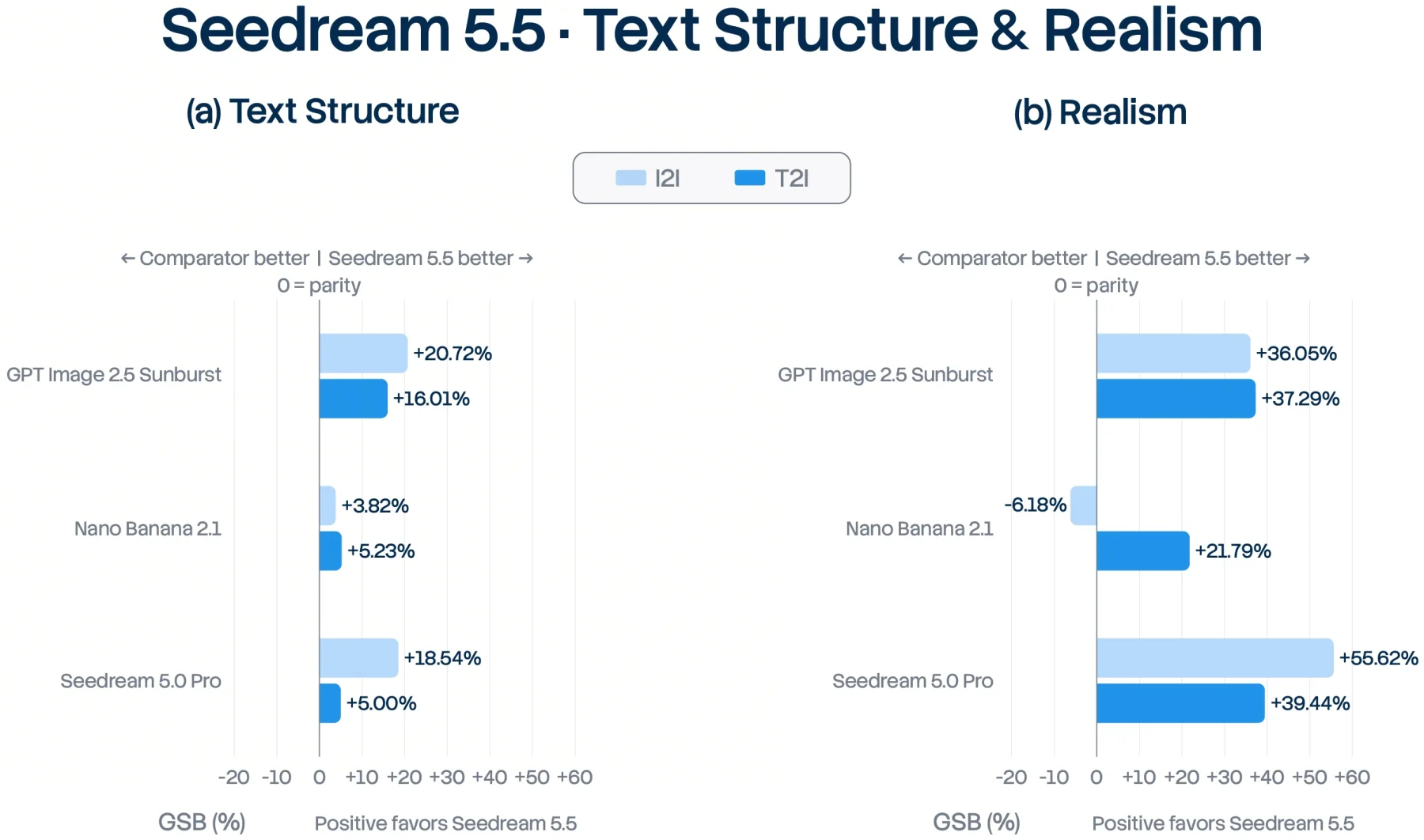
ByteDance’s release reports expert-preference gains over Seedream 5.0 Pro for text structure and text-to-image realism, with the comparison including GPT Image 2.5 Sunburst and Nano Banana 2.1. Its testing used MagicArena and expert ratings across six production categories. These are ByteDance’s own evaluations, useful for identifying tasks to test rather than as an independent model ranking.
Piotr Olszewski’s November 9 hands-on report used WaveSpeedAI for 35 images: 28 text-to-image generations and seven successive edits of one portrait. He reports that the face stayed unchanged in most rounds, but one requested smile was ignored. All four transparent outputs had an alpha channel, while the tested glass objects did not show the background through them. This is a small sample through one provider, so test the edit and alpha behavior on the materials your workflow uses.
For your own comparison, keep the source image, prompt, resolution and edit sequence fixed. Record how many rounds produce an acceptable image, the total charged input and output images, and time to the accepted result. Compare with Seedream 5 Flash or another image model on the same task; a single prompt or general ranking will not tell you how many revisions your workflow needs.
Before you use it
- The 100-edit demonstration follows one selected image through a prepared sequence; the number of rounds alone does not show your usable-output rate or total editing cost.
How to get started
Try one image in an account where Seedream 5.5 is available. Save the output, verify alpha and unchanged details, then check the provider’s actual usage record before scaling up.
Sources
Sources (5)
- Krea: Seedream 5.5 workflow and channel limits ↗
Source checked:
- ByteDance Seed: Seedream 5.5 release and evaluation ↗
Source checked:
- ByteDance Seed: Seedream 5.5 model page ↗
Source checked:
- The Paper: Seedream 5.5 release and reported API cost ↗
Source checked:
- Piotr Olszewski: hands-on test through WaveSpeedAI ↗
Source checked: