
Haru 4B: run a full-duplex voice model locally
Haru 4B is Higurashi’s open-weight, multilingual spoken-dialogue base model. It can listen and speak at the same time, with text and continuous audio in the same frame-based workflow. The official code offers PyTorch, MLX and vLLM-Omni paths. Choose it for local voice research and prototyping; it is a pretrained research model rather than an instruction-tuned customer-support assistant.
Content reviewed:
Download the official Haru 4B checkpoint ↗
Use this model
See access details in the guide below.
Use cases
- Prototype a conversation that keeps listening while the model speaks.
- Study multilingual spoken interaction with a controlled character and reference voice.
- Compare a local voice session with the complete cost of a hosted voice agent.
What Haru’s full-duplex loop does
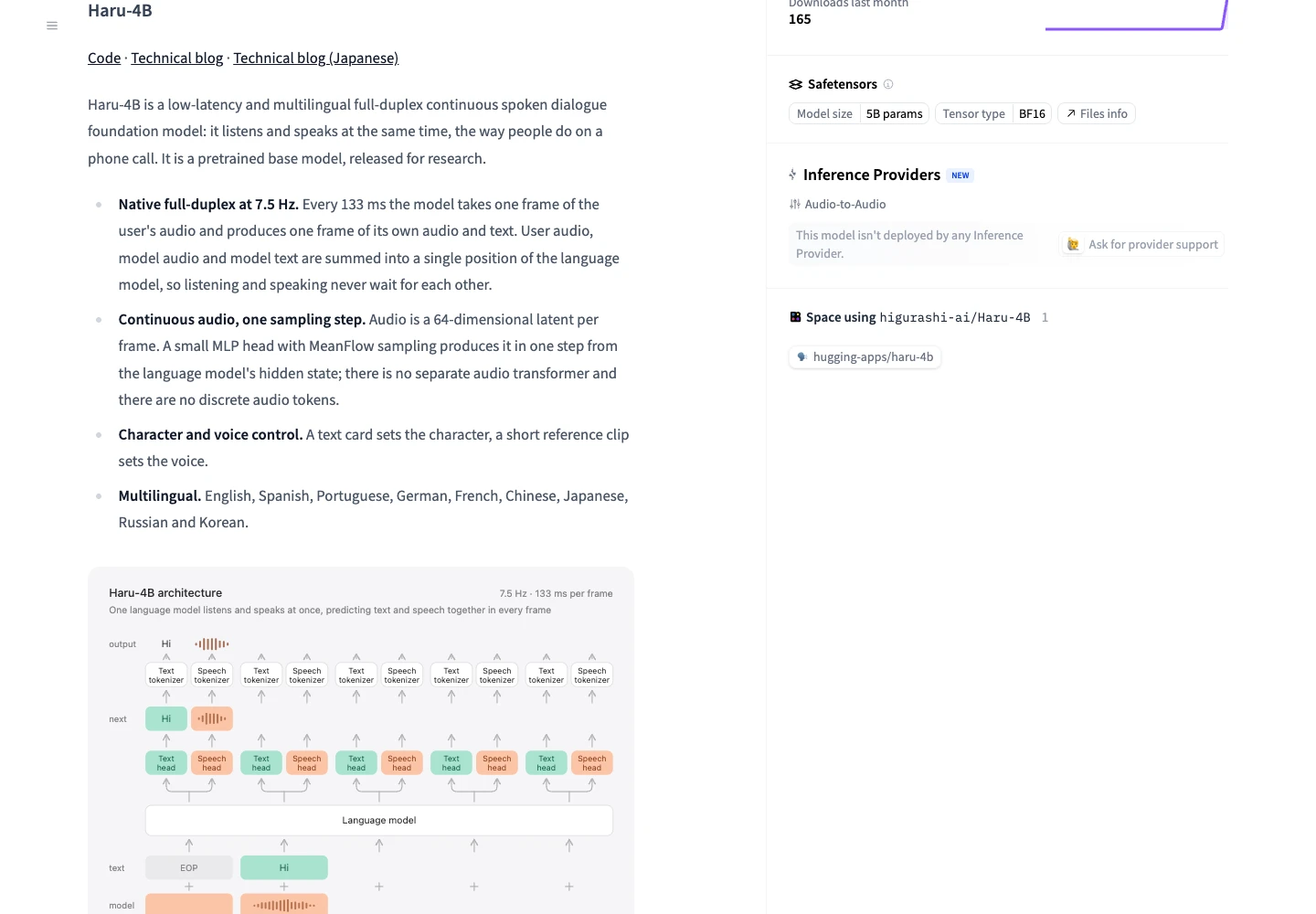
The model operates at 7.5 frames per second. Each 133-millisecond frame takes incoming audio and produces model audio and text. The audio representation uses continuous latents rather than a sequence of discrete audio tokens. This lets the model’s listening and speaking streams overlap.
The frame interval describes the model’s streaming design, not a measured end-to-end response latency. Audio capture, device buffering, model compute and playback all contribute to the delay you hear. Test interruptions and overlapping speech on the intended microphone and headphones.
The release covers English, Spanish, Portuguese, German, French, Chinese, Japanese, Russian and Korean. Use representative speech in the chosen language, including accents and background noise, when deciding whether the base model meets a particular conversational task.
Start a first local Haru voice session
For the PyTorch demo, the official quickstart calls for an NVIDIA GPU with about 12 GB of memory. Start in a separate Python environment and install the project package from the cloned repository. The model downloads on first use, so include network time and disk space in the initial setup.
Open http://localhost:8998 in your browser, select a character and supply a voice clip before speaking. The project ships without voice clips. Use a clean recording of one speaker, from 3 seconds to 3 minutes, with permission to use that voice. A character card controls the persona; the reference recording controls the voice.
git clone https://github.com/higurashi-ai/Haru.git
cd Haru
python3 -m venv .venv
source .venv/bin/activate
pip install -e ./haru
python -m haru.server --hf-repo higurashi-ai/Haru-4BChoose PyTorch, MLX or vLLM-Omni
PyTorch is the direct NVIDIA demo path. MLX targets Apple Silicon and includes a native macOS app. Its app guide requires macOS 13 or later, Python 3.10+, Command Line Tools and at least 16 GB of memory in practice; the model occupies about 10 GB on disk. The vLLM-Omni plugin is a separate serving path for concurrent conversations. All three use the same higurashi-ai/Haru-4B checkpoint, but their installation and audio transport differ.
Treat the roughly 12 GB NVIDIA quickstart as a starting configuration, not a complete memory guarantee for every backend or concurrent load. On a Mac, unified memory is shared with the operating system and other applications. Measure the loaded model, audio processing and active sessions together before planning capacity.
For a Mac, follow the native-app build instructions linked below. For a server, follow the Haru plugin’s matching dependencies before connecting the demo to vLLM-Omni. The general serving-engine guide helps explain the runtime’s role, but does not replace the Haru-specific integration.
A Windows run shows why the backend matters
In an author-run test published on November 13 UTC, yousan used Windows 11, an RTX 4070 Ti SUPER with 16 GB VRAM, about 64 GiB RAM and Haru commit 7fe6b766. The PyTorch WebSocket demo started and held a Japanese conversation, but missing causal_conv1d and flash-linear-attention led to reference-implementation fallback warnings.
The author measured a 135.7-millisecond median warm-up frame time, slightly above the roughly 133-millisecond frame budget. The browser’s smoothed delay statistics then grew over the conversation: the author reports a median of about 0.75 seconds ten seconds in and about 5.3 seconds at the 100-second mark, describing the session as one where delay accumulates. Those statistics are not per-question response latency, and on this machine the session did not stay in real time. Check the backend warnings and a sustained conversation, rather than treating successful model loading as proof of real-time performance.
Budget the complete local voice session
The downloaded weights have no provider token or conversation-minute bill. Your costs are the machine, electricity, storage, serving time and any services added around the model. For a rented GPU, include model loading and idle allocation as well as live conversation time.
As a calculation example, a workstation drawing an assumed 150 watts for 20 hours uses 3 kWh. At an assumed $0.20 per kWh, that is $0.60 of electricity. A rented server at an assumed $1 per hour costs $20 for the same allocation period. Neither example establishes Haru’s actual power draw, throughput or required GPU rental tier.
To calculate an effective conversation-minute cost, divide the complete session expense by accepted conversation minutes. Record concurrent sessions, peak memory, audible delay, interruptions and failed runs. Do not substitute the 133-millisecond frame interval for a measured response time or assume a text-token calculator estimates the audio workload.
Use the research base model within its scope
The official checkpoint is Apache 2.0 licensed. Keep the required license and attribution notices when distributing the covered materials. Rights to a reference voice or source recording are separate from the model license.
Haru is released as a pretrained base model for research. Evaluate its conversational behavior before using it in an application that needs reliable instructions, facts or tool actions. The supplied demo is a way to hear the model; a production assistant also needs the application logic and controls appropriate to the job.
Haru 4B vs hosted voice and text-to-speech
Choose Haru when local weights and control of the audio experiment matter. Fish Audio Live 3 supplies a hosted voice-agent platform with a builder, deployment and minute billing. Those are different starting points: compare the surrounding application work as well as model behavior and running cost.
For a finished narration generated from text, Drama 3 serves a different task and bills hosted use by submitted characters. Use a TTS workflow when there is no need for live listening, interruption or an ongoing conversation.
Before you use it
- The released checkpoint is a research pretrained base model.
- Voice references and backend-specific setup are required for the supplied conversational demos.
How to get started
Start with one local conversation, a permitted reference voice and a checkable listening task. Measure the full session before changing hardware or serving several users.
Sources
Sources (5)
- yousan: author-run Windows and RTX 4070 Ti SUPER test ↗
Source checked:
- Higurashi: Haru 4B model, license and limitations ↗
Source checked:
- Haru: official inference code and setup ↗
Source checked:
- Haru: MLX native app ↗
Source checked:
- Haru: vLLM-Omni serving plugin ↗
Source checked: